
Run a restaurant by asking: what you can ask Yes Chef, with real examples
- Published
- Updated
Yes Chef makes restaurant management software. This page is written by us, about our own product. Pictures show a demo restaurant.
In short
- Ask Yes Chef answers questions from your restaurant’s own records, with a card for each thing it looked up.
- It has the same permissions you have in the rest of the app, and no more.
- Asked to change something, it sets the change up on a card. Nothing happens until you press the button.
- Its summary sentence can be wrong. The card’s figures come straight from the records, so trust the card.
What it is
Ask Yes Chef is the app as a conversation. You ask in your own words. It looks the answer up in your restaurant’s records and tells you in a sentence or two, with a card underneath for each thing it looked up: a list of shifts, a check, a person, a set of figures. Tap the card to open the screen it came from.
It is on the web, beside every page, and on the iPhone as chat mode. Three rules explain most of how it behaves:
- It looks things up. Every figure, name and time in an answer is read from your records at the moment you ask.
- It has your permissions, and no more. What it may look up and set up is decided by your level at the location you are asking about.
- Nothing changes until you press. A change is set up on a card with one button. You read the card and press it.
Who is on
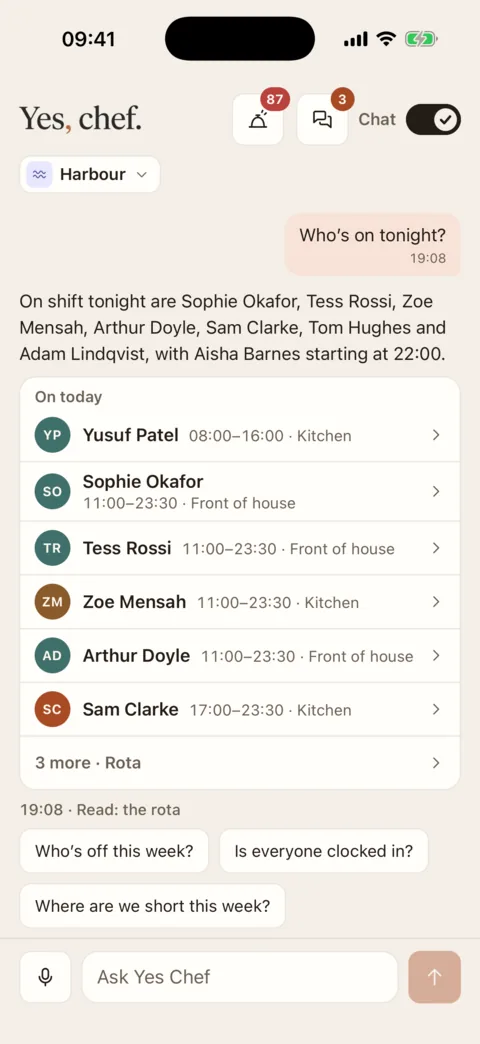
Who’s on tonight?
Who’s on with me today?
When is Sam next in?
Anyone on the team can ask these. The answer is who the published rota has down, not who has clocked in. For that, someone who can see clock-ins asks a different question:
Is everyone clocked in?
Who was late last week?
Days can be said as you would say them, such as “Saturday” or “next Friday”, and a follow-up can lean on the last answer: “and tomorrow?”.
Your own shifts, hours and holiday
When am I next in?
How many hours have I done this week?
Was my shift on Saturday approved?
How much holiday have I got left?
What did I get in tips last month?
Everyone can ask about their own shifts, hours, time off, checks and training. Shifts come from published rotas only. Hours come back shift by shift, each with whether it was approved, is waiting or was declined, and why.
The rota
For people who build the rota:
Is next week published?
Where are we short this week?
Who can cover Sam on Friday?
The cost of a week is given only to people who may see pay rates. And the rota can be changed by asking:
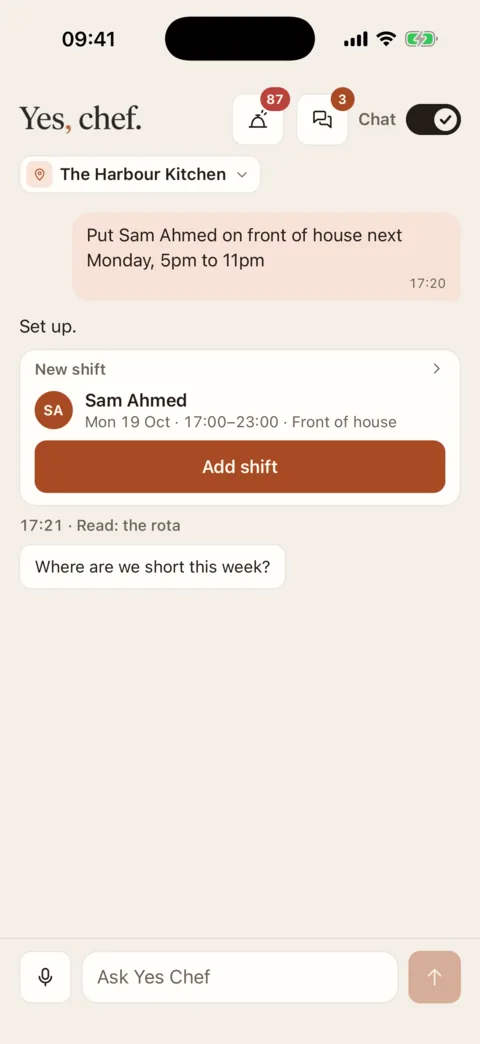
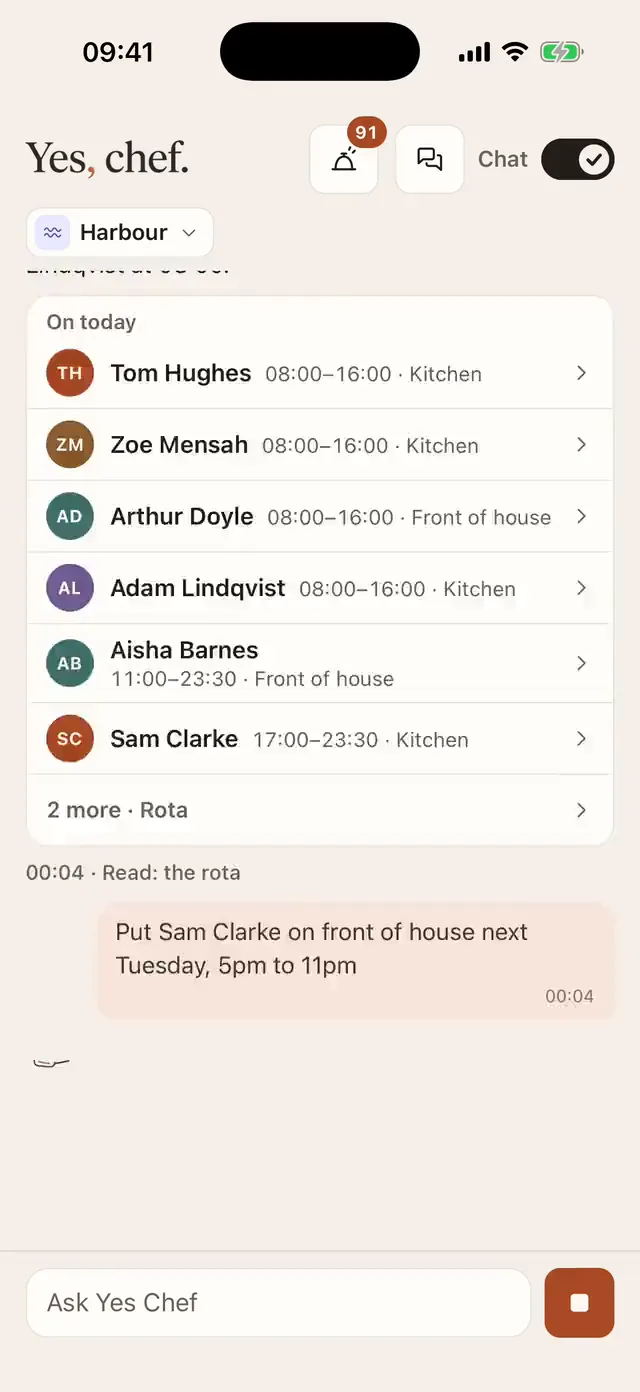
Put Sam on front of house next Monday, 5pm to 11pm.
The chat answers “Set up.” and puts a New shift card underneath showing exactly what will be saved: who, when, where. The button says what it does and who will be told, such as Add shift. Once pressed, it is replaced by a stamp saying what was done.
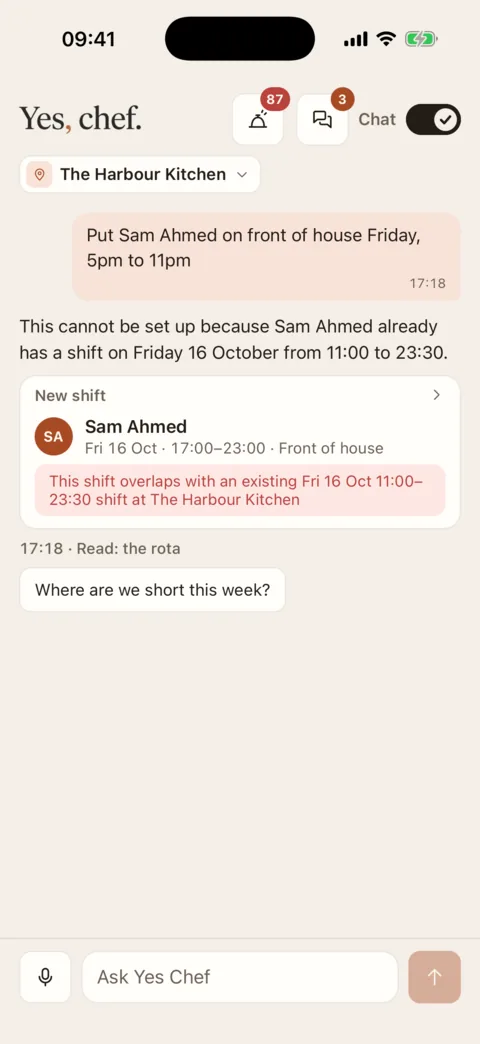
The app’s usual rules still apply. A shift that clashes with another is refused, with the same reason the rota screen would give. Publishing a week and deleting a shift are only set up when you ask for exactly that, and a delete takes two taps.
Checks
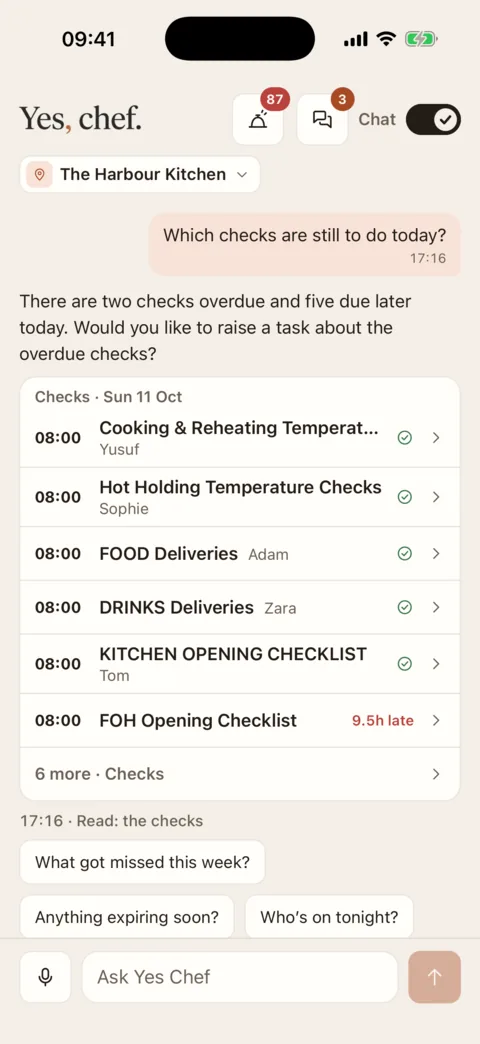
What checks do I have?
What’s overdue?
What was the walk-in fridge at?
How have checks gone this week?
The first lists the open checks on the shift you are working now. The others need the permission to see every check and its history. You can also complete a check in the chat: it asks for each reading or tick, one field at a time, and reads them back before you press Mark complete. “All fine” is not accepted as an answer for a check.
Time off and requests
Book me the 3rd to the 5th of November off.
Any time off to approve?
Who’s off this week?
The first sets a request up on a card with a Request button. For approving, the chat finds the request and shows its own card, with the same Approve and Decline buttons as the rest of the app. “Who’s off this week?” gives who, what kind and which days. It never gives the reason.
Sales
How were sales this week?
How did Saturday go by the hour?
What are our best sellers?
Each needs its own permission, and labour cost and labour % are added only for people who may see pay rates. Ask about a trend over three or more days and a chart is drawn under the answer. Sales come from the till, so without a connected till there are no sales figures to read, and the answer says so.
The menu
How much is the burger?
Which dishes have nuts recorded?
An answer about allergens repeats what is recorded on the menu item, as your team typed it. “None recorded” means nothing is known. It does not mean the dish is free of anything. Always check with the kitchen.
Running the shift
What needs me?
For someone who sees the manager’s dashboard, this gives what is waiting for a decision, who is working now and where the checks stand. And when things have happened, you can say them in one go:
James is a no-show, I’ve clocked Amelia and Finn in, and the bins task is done.
One card appears with a row for each record. You can leave a row out, then press Do all and press again to confirm. For a minute afterwards a no-show mark, a task marked done and a clock-in can each be undone on its row. On the iPhone you can say it aloud instead of typing.
Tasks and messages
What’s on my list?
What tasks are overdue?
It can set up a new task, or mark one done, for anyone who can see the task boards. It can send a message to a person, a group or the team chat, but the words are yours. Say “message the team” without saying what, and it asks what the message should say. It can tell you which chat has unread messages and how many. It never repeats what a message says.
“How do I…?”
How do I add a shift?
Where do I change someone’s pay?
What does Publish do?
These are answered from the help centre, not from your restaurant’s records. The answer is the steps for where you are asking from, the phone or the web, with a card that opens the whole guide.
What it will not do
- Show you anything you cannot already see. If you do not hold the permission, it says it cannot see that. Pay is left out unless you may see pay.
- Change anything by itself. It does not message anyone, publish anything or delete anything without you pressing a button.
- Tell staff about a draft rota. Unless you build the rota, you are told about published weeks only.
- Answer for two locations at once. A conversation is about the location named at the top of the chat.
- Give advice on discipline, or guess why something happened. It reports what is recorded.
- Answer questions that are not about your restaurant, its people or the app.
When it gets it wrong
It can. The figures on a card come straight from your records. The sentence above them is a summary, and a summary can be wrong. The help centre’s own advice is plain: when the two disagree, trust the card, and open the screen it leads to. If it sets up a card for the wrong person, do not press the button. Ask again with the surname, and the new card takes the old one’s place.
What it reads, who processes it and how long questions are kept are set out in what happens to what you ask. Questions and answers are kept for 90 days, and only you see your own conversation.
Why having one place to ask matters is the subject of our piece on management debt.
Questions people ask
What can you ask Yes Chef?
Questions about your restaurant’s records: who is on, your own shifts, hours and holiday, the rota, checks, time off, sales, the menu and tasks, plus how to do something in the app. What you can ask about the team, the rota, sales and checks follows your permissions.
Can Ask Yes Chef change the rota by itself?
No. When you ask for a change it sets it up on a card with one button, such as Add shift. The change is made when you press the button, with your permissions, and the app’s usual rules still apply: a shift that clashes is refused.
Can staff see pay or other people’s details through the chat?
No. The chat has the same permissions as the person asking. Pay is left out unless they may see pay, and it says it cannot see anything they are not allowed to see in the rest of the app.
What if Ask Yes Chef gives a wrong answer?
Check the card, not the sentence. The figures on a card come straight from the records; the sentence above is a summary and can be wrong. Tap the card to open the screen the figures came from.
Can you speak to Ask Yes Chef?
On the iPhone, yes: chat mode has a microphone. Tap to listen, speak, and tap again to send. The chat on the web has no microphone.
See how it works, step by step
Sources
This page states no facts about other companies.
All product names are trade marks of their owners. Yes Chef is not affiliated with any of them. If something here is wrong or out of date, write to omar@1273.co.uk and we will correct it.
Want Yes Chef for your restaurant?
The first three months are free. It is offered to a limited number of restaurants, and we set each one up ourselves, so there is no sign-up form and no published price. Write and tell us about yours.
Get in touchNot your restaurant? Refer a restaurant. When it becomes a paying customer, we pay you £500. How referring works